I rebuilt catharticcamera.com from scratch. Not because the old site was broken — it worked fine. But updating it felt like a chore, which meant updates weren't happening. Every new journal entry required wrestling with the codebase. Every portfolio piece needed manual image handling. And the social media side of running a photography site — consistent posting, captions, cross-platform scheduling — was eating time that should've gone toward actual photography.
The rebuild became three things at once: a better site, a more maintainable codebase, and an automation pipeline that makes promoting the work genuinely low-effort. All of it running on GNU/Linux, all of it open-source, none of it requiring a monthly SaaS subscription.
Why Astro — and what that actually means
Astro is a static site generator that promises performance by default. I'd been curious about it for a while, but suspicious — "performance by default" is a claim most frameworks make and few deliver. For a photography portfolio, though, the architecture made real sense.
The three things Astro does particularly well for this use case:
- Content collections — Journal entries and portfolio pieces live as Markdown files, versioned alongside the code. No database, no API on every page load. Adding a new post means creating a
.mdfile, running the build, and deploying. That's it. - Partial hydration — Interactive components (the contact form, navigation) ship JavaScript only where they need it. The thousands of words of portfolio descriptions? Static HTML. The hero images? Preloaded at build time. The result is a site that feels fast because it genuinely is.
- Build-time image optimisation — Astro generates responsive WebP variants at build time, not on each request. For a portfolio of high-resolution photography, this is the difference between a fast site and one that makes visitors wait.
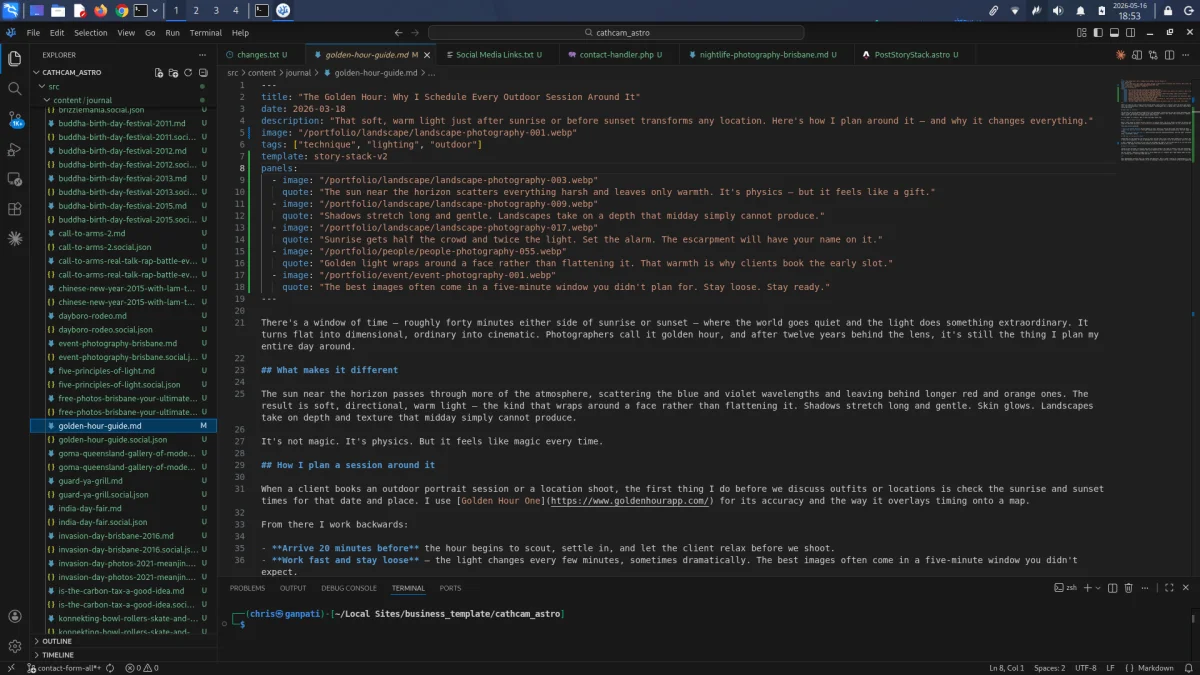
panels: frontmatter defines 5 image and quote pairs that drive the scroll-based slideshow on the live post.The project structure is straightforward. Content collections handle both journal posts and portfolio pieces with typed frontmatter — title, date, tags, cover image. The build validates all of it at compile time, so a missing field fails the build rather than silently producing a broken page. After years of WordPress installs where things could go wrong in production without warning, having the build catch errors is genuinely pleasant.
Scroll-driven panels — a slideshow built into the journal template
One thing that's worth calling out specifically: the journal post template on Cathartic Camera isn't just a header and a wall of text. Each post can define up to five panels in its frontmatter — each panel an image from the portfolio paired with a short quote. As the reader scrolls through the post, those five cards animate in sequence, creating a scroll-driven slideshow embedded in the reading experience.
The implementation lives entirely in the story-stack-v2 Astro template. As the user scrolls down the page, each card transitions into view — the image fills the frame while the quote fades up underneath it. No JavaScript library required beyond what ships with Astro's animation primitives. The five cards are declared purely in frontmatter, which means adding them to a post is as simple as adding five lines of YAML. The template handles the rest at build time.
What this does practically: a journal post about golden hour lighting doesn't just describe the quality of light — it shows five portfolio images of it, each paired with a line about what made that particular shot work. The scroll animation keeps the reader in the post rather than bouncing them to the gallery. It's a simple mechanic, but it closes the gap between writing about photography and actually experiencing it on screen.
Affirmation cards — the feature that started as an offhand comment
Pooja loved these style of affirmation cards, she used to collect them. The idea was to turn the gallery work into quick affirmation cards that could be shared without needing to open GNU Image Manipulation Program. It started as a small feature.
The ask itself pointed at a real problem: the gap between "we have all this photography" and "we're actually using it for anything." We worked together on many professional photoshoots, she always had the best ideas.
"Every moment behind the lens is a moment of honest connection." — Cathartic Camera
The feature hooks into the build process. When new portfolio images are added, a script runs against them, generates affirmation text relevant to the image content, and produces the card graphics as PNG files ready for social media. No Canva, no manual cropping, no caption-writing at 11pm.
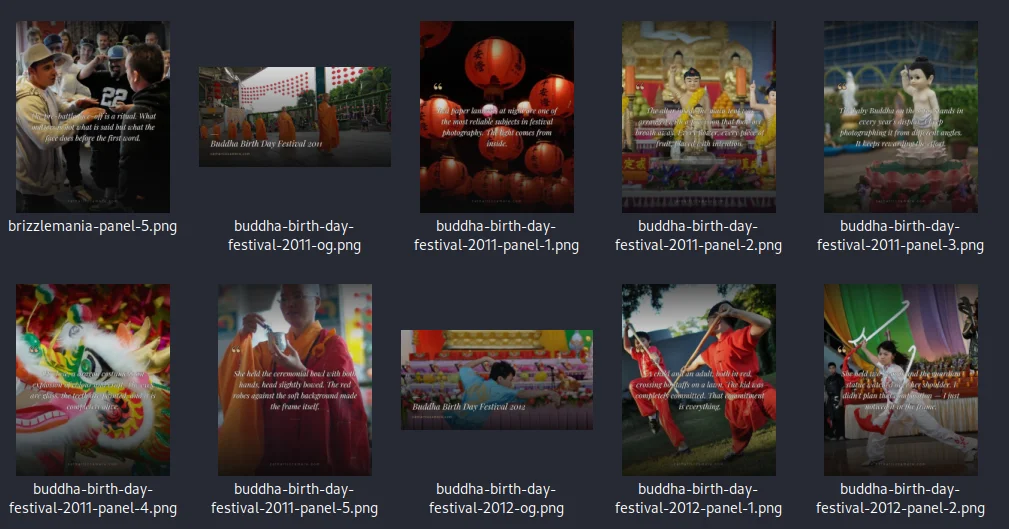
The implementation is not complex. What makes it useful is that it's wired into the workflow rather than sitting as a separate manual step. The mental overhead of "I should make some cards from these photos" disappears when the cards just exist after a build. That's the principle I kept coming back to: remove friction at the point where friction causes the thing not to happen.
The Postiz pipeline — social scheduling without the SaaS overhead
A photography portfolio only works if people see it. Consistent posting to Instagram, Facebook, and X matters, but manually managing five platforms is the kind of work that gets deprioritised. The solution was a bash script that turns the build output into scheduled Postiz posts.
Postiz is an open-source social media scheduling tool — self-hostable, with an API, and a clean calendar interface. It's the bridge between the build pipeline and the platforms.
The bash script handles everything in sequence:
- Scan the content directory and list all portfolio posts with their caption generation status
- Select a post to work with — new posts, or ones whose captions need regenerating
- Generate captions via the AI pipeline (dry-run preview available before committing)
- Schedule the resulting posts to Postiz across platforms on a sensible cadence
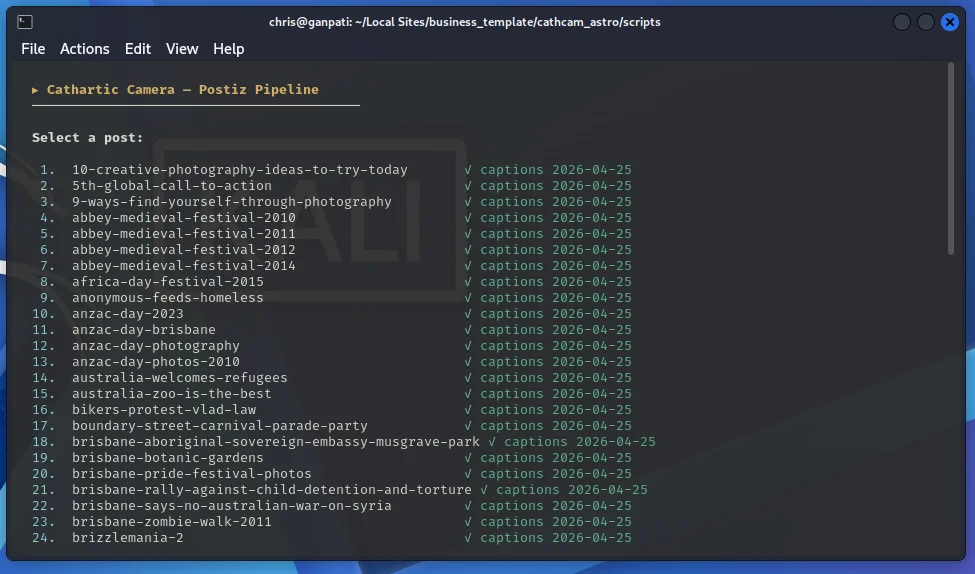
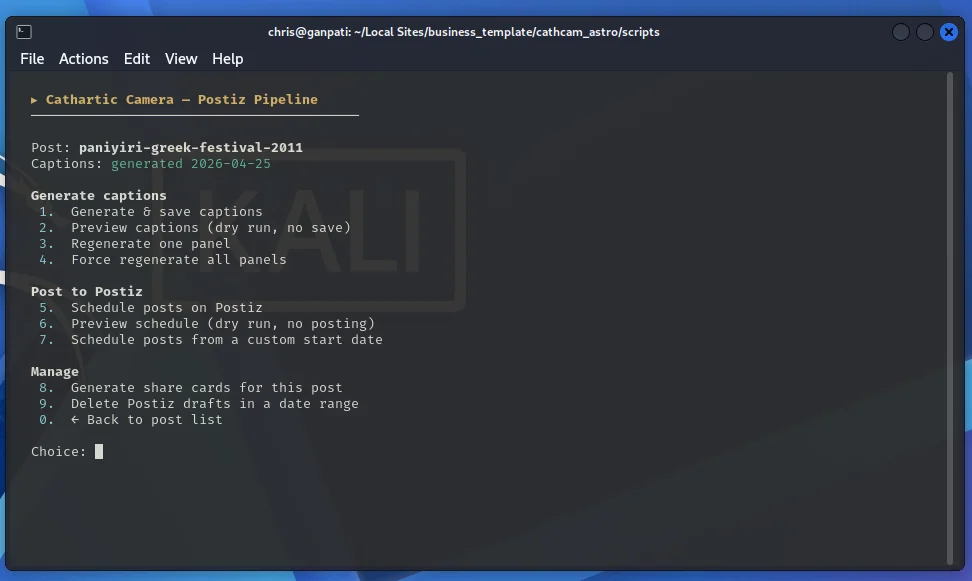
The dry-run option on both caption generation and post scheduling is non-negotiable. Before I added it, testing the pipeline meant actually posting things or manually cleaning up Postiz drafts. Now you can run the full process, review the output, and only commit when you're satisfied. The script also handles cleanup — deleting drafts in a date range if you need to reschedule a batch.
The result in Postiz looks like this — a full week of scheduled posts across channels, queued without a single manual upload:
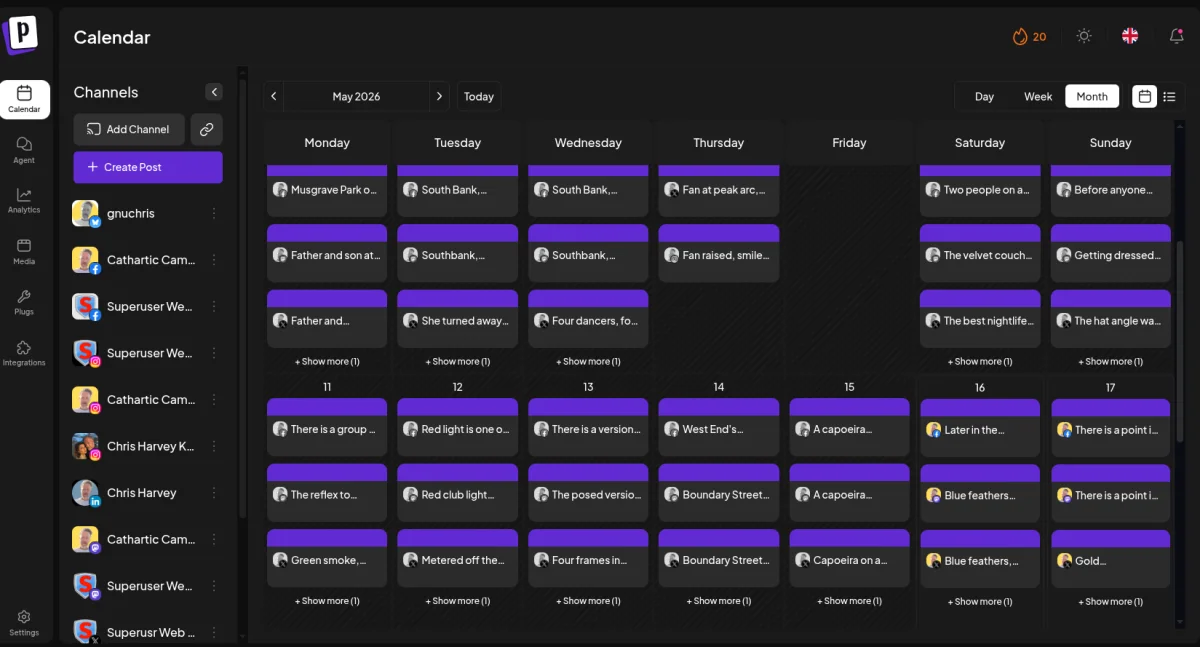
The scheduling removes the "I forgot to post" guilt loop. Content is already queued before the week starts, the timing is spread sensibly, and the work keeps going out.
Performance — the number that feels suspicious
PageSpeed Insights on the production build came back with 97 for Performance, 100 for Accessibility, 100 for Best Practices, and 100 for SEO. The 97 is honest — there are third-party scripts that knock it off 100. But 97 is not a vanity metric here. It means the site loads under 2 seconds on 4G. Visitors see portfolio images immediately rather than watching a loading spinner.
The comparison that made this concrete: the previous WordPress install on the same server was scoring around 74-76. The photography was identical. The server was identical. The framework was the variable. Astro's build-time image pipeline and zero-JavaScript-by-default approach did the rest.
For a photography site, this matters directly. If the images load slowly, the first impression of the work is bad before anyone's even formed an opinion about the photography itself.
What the rebuild actually taught me
The technology choices were straightforward once I framed the problem correctly. The question wasn't "what's the most impressive stack" — it was "what does a photographer actually need from their website?" The answer was narrow: make the work easy to see, make the site easy to update, and make promotion stop being a task that requires willpower.
Astro handled the performance and the update friction. The bash pipeline handled the promotion friction. The affirmation card generation handled the "what do I post today" friction. Each piece removed one specific overhead. None of it required a subscription, a SaaS login, or vendor lock-in.
The principle generalises. If updating your portfolio feels like work, you won't update it. If scheduling social posts feels like a chore, you'll skip it. Wire the friction points out of the system, and the creative work becomes the main thing again — which is what it should have been the whole time.
The live site is at catharticcamera.com — worth looking at on a fast connection to appreciate the image loading. If you're thinking about a similar rebuild for your own portfolio, get in touch.