Making sculpted chair for secondlife part 2
Following on from part 1, in this episode we finish modeling our chair, then bake the sculptmap, texture and preview them in opensim.
Watch it below or watch it on youtube.
Visit Archive.org and download the Ogg video or Avi.
Download Making sculpted chair for secondlife files (76) - 621.52 KB , it contains the blend file, sculptmap and texture used in the tutorial.
All files and video released under CC-BY2.5-AU license.
Make sure you visit Teachers Without Borders space on Secondlife to check for upcoming events.
Makehuman and Blender using Ubuntu Hardy
August 26, 2008 by Chris · 2 Comments
MakeHuman is a software application that generates 3D humanoids; similar to Poser or DAZ Studio. It is written in C++ and Aqsis is necessary to produce a render. The MakeHuman team work towards correctness both in programming (using common file formats) and anatomy. MakeHuman makes extensive use of university research in accurately modelling the human form.
I’ve been learning character animation with Blender and found Makehuman. Here’s the MakeHuman to Blender Part I tutorial on Blender Underground, follow the links to part 2 and 3. Also check out the Blender Underground video tutorials. The videos and tutorials are awesome.
There was one problem I had installing Makehuman and that was with Aqsis.
The MakeHuman project uses Aqsis to produce realistic renderings of the human body.
I stuffed around trying to compile from source then found that the problem was a bug with Ubuntu Hardy, Aqsis fix on Ubuntu Hardy.
It is a lot of fun playing with settings. Watch this makehuman video on youtube.
What I found really interesting was when you import your model to blender, I did this using the collada import plugin. I’ll try to explain a little using the screenshot below.

By default the skeleton and armature are placed inside the body, I moved them out of the body to show you. Im sure having the armature already set up will save a lot of time, armature is kind of skeletal structure used for animation. Watch Super3boy’s 20th Blender Tutorial(Using Armatures) on youtube for a good introduction to armatures. The other at the back is the human skeleton. The other thing you can’t see here is the skin, I still have a lot to learn and texturing/skinning the meshes looks difficult. On top of all the 3d stuff theres so much I’m learning about the human body.
The other thing I’m enjoying about learning Blender this time around is the community at blenderartists.org. The way the more experienced guys explain things, the terminology they use is really helping me along and of course being able to use some of their source files is incredibly useful.
Checkout this forum post “Skin with multilayered sss experiments” by Pixelvore, he’s 16 and been using blender for around 3 years, look at all the things he knows and what he can do.
Another gem I found in the forums was “2008 Adelaide Uni Short Film Festival Entry *Winner*“.
I use Blender for making sculpties for secondlife, mainly my gnu head and horns and a few other things. Useful links:
I recently noticed Blender to SL BVH Animation Exporter. Looks really good. Read the tutorial, here’s the update.
I almost forgot, hopefully I can get one of my mates over so we can strap bra’s to our heads and create our perfect woman.
Open source scripts in Second Life
August 18, 2008 by Cath · Leave a Comment
Chris has found a couple of scripts which may be useful to educators and builders in Second Life.
The Linked Prim Animator Lite (LPAL) is a set of open source scripts which enable you to animate linked objects and attachments . LPAL is free software: you can redistribute it and/or modify it under the terms of the GNU General Public License as published by the Free Software Foundation.
Open Babel Fish is an open source babbler, the scripts run on Google Translate and a php script that must be placed on your own web host.
Both scripts can be purchased free from SL exchange. Its really awesome to see such useful tools being released under the terms of the GNU General Public License, so that we can freely modify them to suit our needs and in doing so contribute to the project.
Open source tools in Secondlife – Builders Buddy
May 18, 2008 by Chris · 2 Comments
I’ve been thinking about what other useful tools I can introduce to educators in secondlife. Builders Buddy is useful for people interested in building. I put together a small package with a tutorial, you can get a copy of builders buddy in sl. Watch the Builders Buddy video on youtube to see what it is. Probably one of the cool things I didn’t mention was wearing it as an attachment and using it to rez a few seats that would follow you around. Maybe I’ll make a part 2 video that also looks at the configuration options at the top of the main script. People used to proprietary products in sl would probably know of something like this that’s usually called a rez box.
Emulating OLPC on Edubuntu
January 8, 2007 by Chris · Leave a Comment
Useful Links:
$ sudo apt-get install qemu
Download the latest stable image. I downloaded this image.
Extract the image.
$ bunzip2 olpc-redhat-stream-development-build-193-20061203_1727-devel_ext3.img.bz2
Use qemu to launch the OLPC environment.
$ qemu -hda olpc-redhat-stream-development-build-193-20061203_1727-devel_ext3.img
Press the “a” key when you see this screen.

Press the “a” key again when you see this screen.

Append apm=off to the end of the line and press enter.

You can also replace vga=0×311 with vga=789 for 800×600(24bit color). Here’s more info on vga.
At the login screen your keyboard and mouse might not work.
Press Alt + Ctrl + 3 to enter the terminal mode of the OLPC, login with username root and press enter for password. Then type.
$ modprobe i8042
Bring your network up by typing
$ dhclient
Press Alt + Ctrl + 1 to return to the graphical mode of the OLPC.
If your using windows then my guides on running GNU/Linux on windows might help, my old video of OLPC Fedora Core on windows Video(flash) shows a skinny version of fedora core that was used in the early days of OLPC so I’m thinking about screencasting my latest efforts but if you just watch this video you can see the results.
Learn by doing, remember the OLPC project is an education project not a laptop project. I especially enjoyed playing with the Squeak Etoys Activity.
Matthew Fulmer has been hard at work putting together an annotated list of Squeak tutorials. Check them out, its the best list. Some software developers might be interested in PataPata, it’s a pythonic version of Squeak in early phase of development.
Blender models and Star Wars
November 13, 2006 by Chris · Leave a Comment

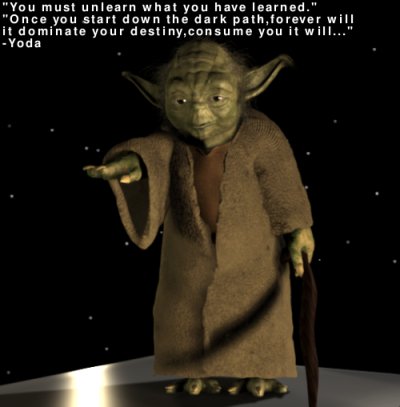
That quote is what I think Master Yoda would say about being trained to use proprietary software at school. One of my young friends likes Blender and Star Wars, I think he is going to be really happy because the image above was created using a rigged model of Yoda. Rigged basically means the model has a skeleton so its easier to pose and do animation. Matt Hoecker released it as a dot blend file. How good is that. Star Wars fans would also like his short Planet Approach clip. I think you would also like to check out Wookieepedia – The Star Wars Wiki.
For learning about modelling, rigging and animation here’s some really nice dot blends:
- Squeek, blend file released under Creative Common License
- Ludwig a fully rigged and animation ready character for Blender
I learned so much so quickly from playing with Ludwig, its user friendly and would be pretty easy to do some cool character animation. As usual you can always check my bookmarks for the resources I’ve found useful, the other one I would recommend is BlenderArt Magazine – Your online source for 3D news and information about the Open-Source 3D Program and related open-source software
Videoblogging with Free Software lesson
November 12, 2006 by Chris · 2 Comments
I put together a lesson on how to Vlog with Free Software. I thought about doing the whole thing as an instructional video but that would end up being a huge file so this is enough to get you up and running. Below is the screencast for introducing the software thats used in the lesson.
Download video clip for play on a Free system 4.4Mb
Download video clip for play on Windows 8.2Mb
Download video clip for play on Mac/Apple 8.0Mb
Its an early release so hopefully it will be useful to some people. Here’s my Videoblog examples, thanks to Blender and Stephen Downes they received some attention. I”ll add them to the Multimedia Library soon.
noiesmo Ubuntu/Open Source Podcast no. 1
October 13, 2006 by Chris · Leave a Comment
Check out noiesmos podcast. I’ve listened to a lot of podcasts from all kinds of people, experienced public speakers, professional educators, complete newbies and everything in between. I think noiesmo did an excellent job for his first podcast. I’m guessing he would be critical of the intro where he adds an aussie hiphop spin to it but I thought that was funny in a cool way so keep it up.
Download the MP3, Download the Ogg.
[audio:http://ia331327.us.archive.org/0/items/noiesmo_podcast_09102006/podcast_noiesmo_09102006_01_64kb.mp3]

![[Attribution 2.5 Australia] [Attribution 2.5 Australia]](http://i.creativecommons.org/l/by/2.5/au/88x31.png)